One of the awesome things about working in IT generally, and my job specifically is that I get to see a lot of new tech hardware. Laptop reviews are better left to the army of tech bloggers, so instead I’ll share with you a laptop rant after extended use of what I believe is the best laptop on the market today.
Geek Reasons
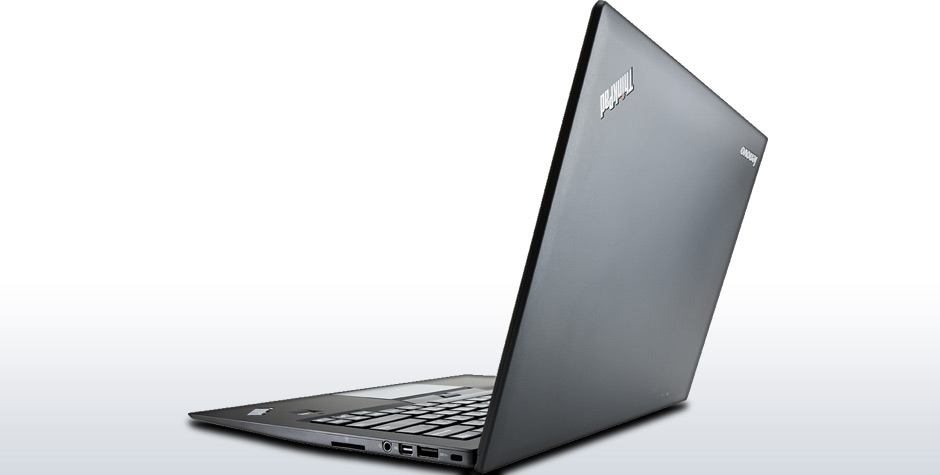 The Asus Zenbook Prime may look better on paper, the XPS12 has a 1080p screen, but the Lenovo X1C Touch wins me over. The other contender is the Microsoft Surface Pro and while it is a brave call to bet something as valuable as a PC refresh on a first gen hardware design, Fortune has been known to, when the conditions are right, favor the brave. However, ranting and raving about surfaces (surfi?) is a post on it’s own, and will have to wait until another day.
The X1C brings better build quality, amazing keyboard & track pad and a fairly good touch panel (full disclosure: there was some driver-fu that I had to perform, to the extent that I got on the phone with Lenovo support to get an interim driver build – but the fact that I could go through that process painlessly is impressive – your move, Sony Vaio).
The screen is a 1600 x 900 matte display (yay) but slightly visible capacitive grid (boo), which makes everything look a little more grainy than other ultrabooks. However, glossy screens drive me crazy, especially in our modern habitats adorned with overhead fluorescent lighting. I find that the less than Full HD resolution isn’t a problem when I am at my desk as I plug in a 27″ monitor with the mini-display port (drives 2560×1440 no problem with the intel integrated graphics).
The X1C charges its battery in about half an hour (how did I live before this feature?) and lasts about 5 hours, which is about average for ultrabooks.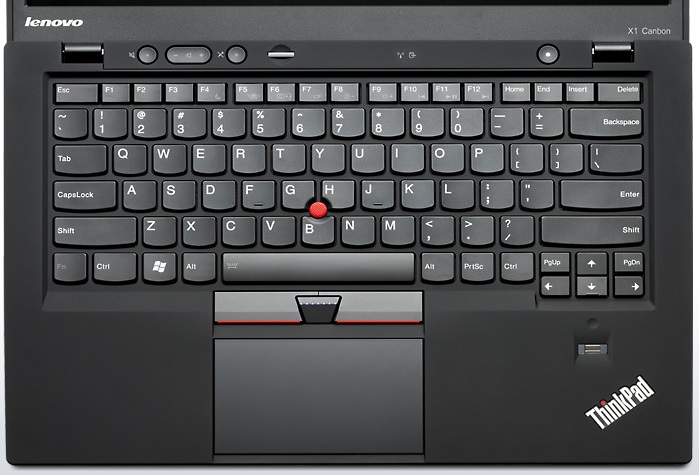
The input methods are often overlooked in business laptops, but the X1C delivers in spades. The keyboard is a delight to use, the touchpad works as advertised and the TrackPoint is still there for the nub-converts. One note on the touchpad (and touchpads in general) is that I prefer to disable the edge gestures. While it is a great feature on non-touch laptops, I find that if I need these gestures, I just reach out and touch the screen itself.
Once you start using touch, it is hard to go back to a boring old display panel. While I don’t use it for every day use, I find that touch is great when I am in transit, on buses, airplanes or just lying on the couch. Windows 8 is really optimized for touch use with your thumbs – most things are commonly flickable from the edges of the screen. While some people insist on touch ultrabooks causing gorilla arm, I find that I lean on my elbows when using it like a tablet, preventing said effect (probably a ergonomics nightmare – but one of my many bad habits).
The one input method overlooked is the stylus. I really want a PC with a stylus… but without the clunkiness of the X220Ts of yesteryear. I can’t help but think that digitizer support on the X1C would make for an amazing laptop – with it’s ability to lie flat it could make for an interesting inking device.
I’d also love to see a proper dock (not those crappy USB3 port replicators) with extra ports for driving multiple monitors, a discrete graphics card and SATA ports via a thunderbolt bus or equivalent. Hey, it is my blog – a boy can dream, can’t he?
Style Reasons
But perhaps the biggest reason to go with the ThinkPad is that it is the only laptop that anyone in business takes seriously. It is the PC equivalent of a crackberry, dark grey suit and a doubleshot of espresso – it says “I’m busy doing proper work” and exudes a certain ugly don’t-f-with-me swagger. It is the Frank Underwood (or Francis Urquhart) of laptops. It also ages well and isn’t likely to go out of style (well, the ThinkPad have been so consistently unstylish it is their brand promise these days).
While the creative set (or, the faux-creative set, you know who you are) will fawn over Apple products and the Chromebooks may carve a niche in the silicon valley echo-chamber, the ThinkPad endures as an unassuming velvet black monument to the power user. The ThinkPad is a survivor, it survived IBM and is proof that Chinese technology companies can build, brand and sell premium devices. It is the type of laptop that can run the spreadsheets that power the global economy, hide in briefcases and messenger bags without judging and (probably, haven’t tested this yet) stop bullets and endure the imminent zombie apocalypse.
Conclusion
So, net-net I think the Lenovo X1C is the only credible business laptop at the moment. Of course, hardware is fickle and a month is a very long time in technology. Intel’s Haswell heralds a new crop of business laptops on the horizon and the true, full featured, stylus equipped, convertible laptop still eludes me.
While it is pricey, the X1C is powerful, capable, and stylish in its unique ThinkPad way. While your style and needs may differ, it seems to me like many other PC vendors are focused on combining the limitations of a MacBook Air with the craftsmanship that bargain basement OEMs pride themselves on never demonstrating.
 Superstratum